Monthly Archive for April, 2009

Configuring a Mail Server with Postfix

I gave a presentation about Postfix to the Marquette University ACM chapter. It should be a useful starting point for configuring a Postfix mail server. I include details about much of the configuration including canonical maps which was something that I initially found difficult to figure out.

Rather than creating my presentation in Microsoft PowerPoint or OpenOffice.org Impress, I decided to check out the LaTeX Beamer package for my presentation. Since I’ve been using LaTeX for a while, it wasn’t too difficult to figure out, and it worked particularly well because most of the presentation is Postfix configuration text which I could easily include in the presentation.

The presentation is available as a PDF for download.

Resizing LVM Partitions

My brother Ben has installed quite a few games and other things on his Ubuntu desktop. Because most of these are programs are available as packages, his 6 GB root partition started getting a bit small. He has a 500 GB hard drive partitioned into root, swap, and home. Ben and I decided to transfer 20 GB from his home partition to his root partition. The drive was configured with LVM which is supposed to make this procedure simple. It turns out it was mildly more complicated than simple, but it wasn’t too bad.

The first step is to boot from a CD like GParted. GParted provides the necessary LVM command line tools to resize the partitions. We need to boot from a CD or another drive because we will be modifying the root partition.

Because I was booted from a CD, I did not capture the output from the commands that I used. The first step is to find the name of the LVM volume group:

lvdisplay

On Ben’s computer, the volume group was “loki”. Next, we make that volume group available:

vgchange --available y loki

Then we decrease the size of the home partition. First we resize the EXT3 file system and then we resize the LVM partition. The “e2fsck” commands check and repair the file system as we go. We are resizing the home partition from 440 GB down to 420 GB.

e2fsck -f /dev/loki/home
resize2fs /dev/loki/home 420G
e2fsck -f /dev/loki/home
lvreduce --size 420G /dev/loki/home
e2fsck -f /dev/loki/home

Once the 20 GB is available, we increase the size of the root partition. We do this in reverse order. First we increase the size of the LVM partition and then increase the size of the file system.

e2fsck -f /dev/loki/root
lvextend --size +20.15G /dev/loki/root
e2fsck -f /dev/loki/root
resize2fs /dev/loki/root 26G
e2fsck -f /dev/loki/root

We rebooted Ben’s computer again, and he now had 26 GB root partition.
OWA Sync on Ubuntu

Update: OWA Sync V0.6 (the current version) is not compatible with Exchange 2007. When I set this up, I was connecting to Exchange 2003.

I use OWA Sync to get all of my calendar information onto my Ubuntu desktop. I recently rediscovered the Little Brother’s Database and decided to make my OWA contacts available in Mutt on my Ubuntu desktop, too. (I used lbdb to make my contacts in Apple Address Book available to Mutt when I was still using Mac OS X as my primary operating system.)

The OWA Sync website has a decent explanation of creating a owaSyncrc file. After I created that, I wrote a script that runs as a cron job.

#! /bin/bash

export PATH=$PATH:/usr/local/bin/

/usr/local/bin/owaSync.kit -update

cat $HOME/.owa/Calendar/*.ics > $HOME/.calendar.ics
cat $HOME/.owa/Contacts/*.vcf > $HOME/.contacts.vcf

After a bit of trial and error, I figured out that “/usr/local/bin/” needed to be in the path for the owaSync.kit script to run. After the synchronization is complete, I then concatenate all of the calendar events into a single file and all of the contact cards into a single file. I now have a single calendar file that I can use with PHP iCalendar and a single contacts file that I can use with lbdb. It requires a fairly simple rc file that looks something like this:

METHODS="$METHODS m_vcf m_muttalias"

VCF_FILES="$HOME/.contacts.vcf"
MUTTALIAS_FILES="$HOME/.mutt/aliases"

I add “m_vcf” and “m_muttaliases” to the “METHODS” and then I specify the locations of my OWA contacts and my Mutt aliases. Now when I launch Mutt, I can query for addresses that I downloaded from OWA.

Adobe Flash 10 on Ubuntu Hardy Heron

I finally got sick of having to use Hulu on my MacBook Pro instead of my Ubuntu desktop and decided to see if I could fix the Flash player problems. It turns out that the fix was simple. This article from Ubuntu Geek makes it easy. Since I am running a 64-bit OS, I used the 64-bit instructions:

wget http://queleimporta.com/downloads/flash10_en.sh
chmod +x flash10_en.sh
sudo bash ./flash10_en.sh

Now Hulu works just fine in Firefox on Ubuntu.

April Fools Prank

Inspired by Upside-Down-Ternet, I decided to get two of my housemates back for the Tabasco and Whiskey shot that they gave me when we went out for my birthday. Flipping all of the images upside down was a little too subtle though. I prefer the all-out, in-your-face kind of April Fools revenge prank.

It turns out all I had to do was find the IP addresses for my housemates’ computers, create the awesome pwned page, and issue two commands on my DD-WRT router:

root@Madrona:~# iptables -t nat -I PREROUTING -s 192.168.1.187 -p tcp -j DNAT --to-destination 192.168.1.42
root@Madrona:~# iptables -t nat -I PREROUTING -s 192.168.1.190 -p tcp -j DNAT --to-destination 192.168.1.42

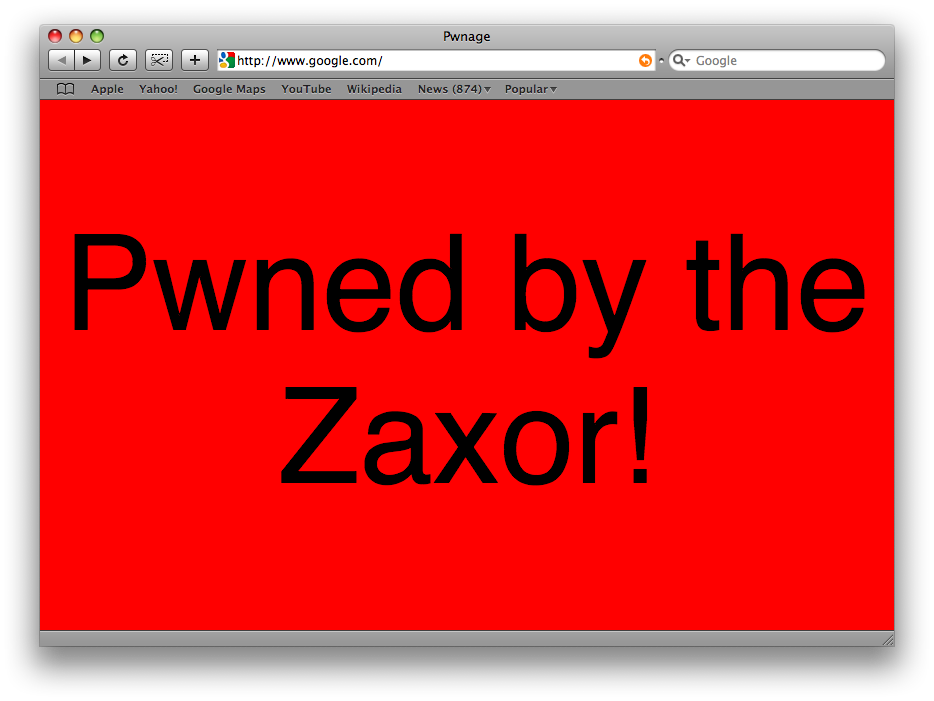
When those two housemates went to check Facebook (or any site) this morning, they were greeted with this instead:

Pwned by the Zaxor!

Pwned by the Zaxor!

Their reactions made it worth it. Tyler said, “Pwned? What is pwned?” David said, “What the hell is a Zaxor?”

Even though I downed the entire Tabasco and Whiskey shot, let this be a lesson that I always take my revenge convey my thanks in kind.