A couple years ago, I built two servers and used EVGA 680i SLI motherboards. I chose that particular board because it had two Ethernet jacks and six SATA ports. At the time, I also purchased three SATA hard drives and a SATA optical drive. I plugged the four devices, installed Ubuntu 8.04 LTS and thought nothing of it. When I updated one of my servers to 8.10, I noticed that one of the newer kernel versions didn’t seem compatible with the drive configuration. I used an older kernel version, and eventually, I replaced SATA cables and switched the active SATA ports around. Eventually, it began working correctly on the latest kernel. I upgraded to 10.04 LTS, and things continued without incident.
However, a couple days ago when I decided to install a fourth hard drive, I again ran into the same problem. I did some searching and discovered some possible bugs. One of the solutions is to build a custom kernel. I opted to simply shuffle the SATA cables around again and moved all four hard drives to the four ports facing upward (ports 3-6) on the motherboard. I moved the optical drive to one of the two ports facing outward (port 1) on the motherboard.
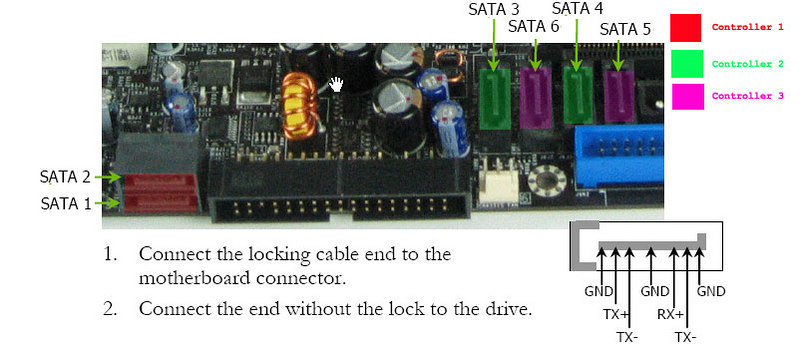
Since the problem occurs during the boot process, and only seems to affect ports 1-2, all four hard drives function properly, and I can still boot from an optical disc or mount a disc once the computer has finished booting. Unfortunately, this solution makes adding a fifth (or sixth) hard drive impossible, but it’s a solution I am willing to live with until the problem is resolved (if it is resolved).